How to Know When to Deload Without Guessing

The Stronkr Founder Founder, Stronkr
5 min read
On this page
Most lifters decide when to deload the same two ways: a fixed week every fourth or fifth block, or the week they finally miss a rep. The first is a calendar making a physiological decision. The second is a diagnosis delivered after the patient has already stalled.
There is a signal sitting in between, and you have probably been generating it for years without recording it. It is not the weight on the bar and it is not the reps. It is what a fixed load costs you. When 225 for five feels like an RPE 7, then 8, then 9 across three sessions, nothing on your log has changed, the weight column reads 225 every time, but everything about your readiness has.
This post covers that signal, why a scheduled deload usually misses it, and what happens when the app reads it for you instead.
Key takeaways
- The deload signal is RPE creeping upward at a fixed load, not a missed rep.
- A calendar deload is timed against your program. The signal is timed against you.
- Stronkr’s site states it suggests a deload when your RPE spikes, before you stall.
- The prescription arrives for your next session as
Deload -10%, not as a chart to interpret.
What This Looks Like in Stronkr
The whole loop runs through two screens, and you only type on one of them.
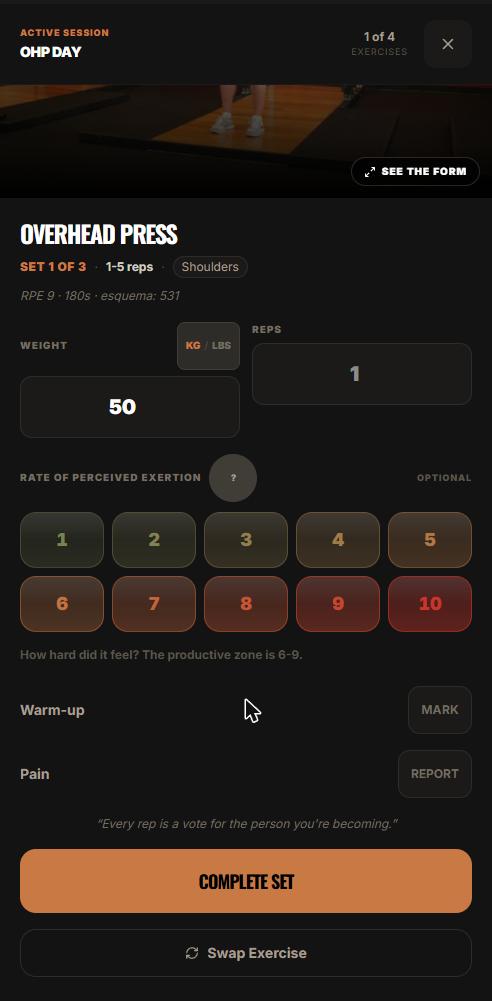
- In the session, you rate each set 1 to 10 on the RPE selector under the weight and reps fields, then press COMPLETE SET. That rating is the raw material for everything below.
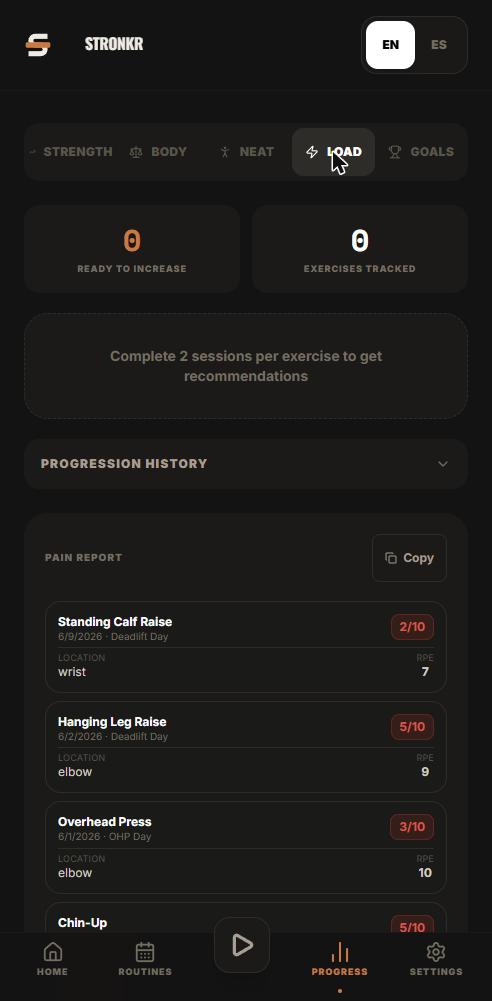
- In Progress, under Load, the view is per exercise. You are looking at one lift’s own history, not a program-wide fatigue score.
- That history is the progression record for the lift, the loads you actually worked at, session by session, as logged.
- Alongside it sits a ready-to-increase recommendation: the engine’s read on whether that exercise has room right now.
- On the free tier, this history goes back 90 days. PRO carries full history.
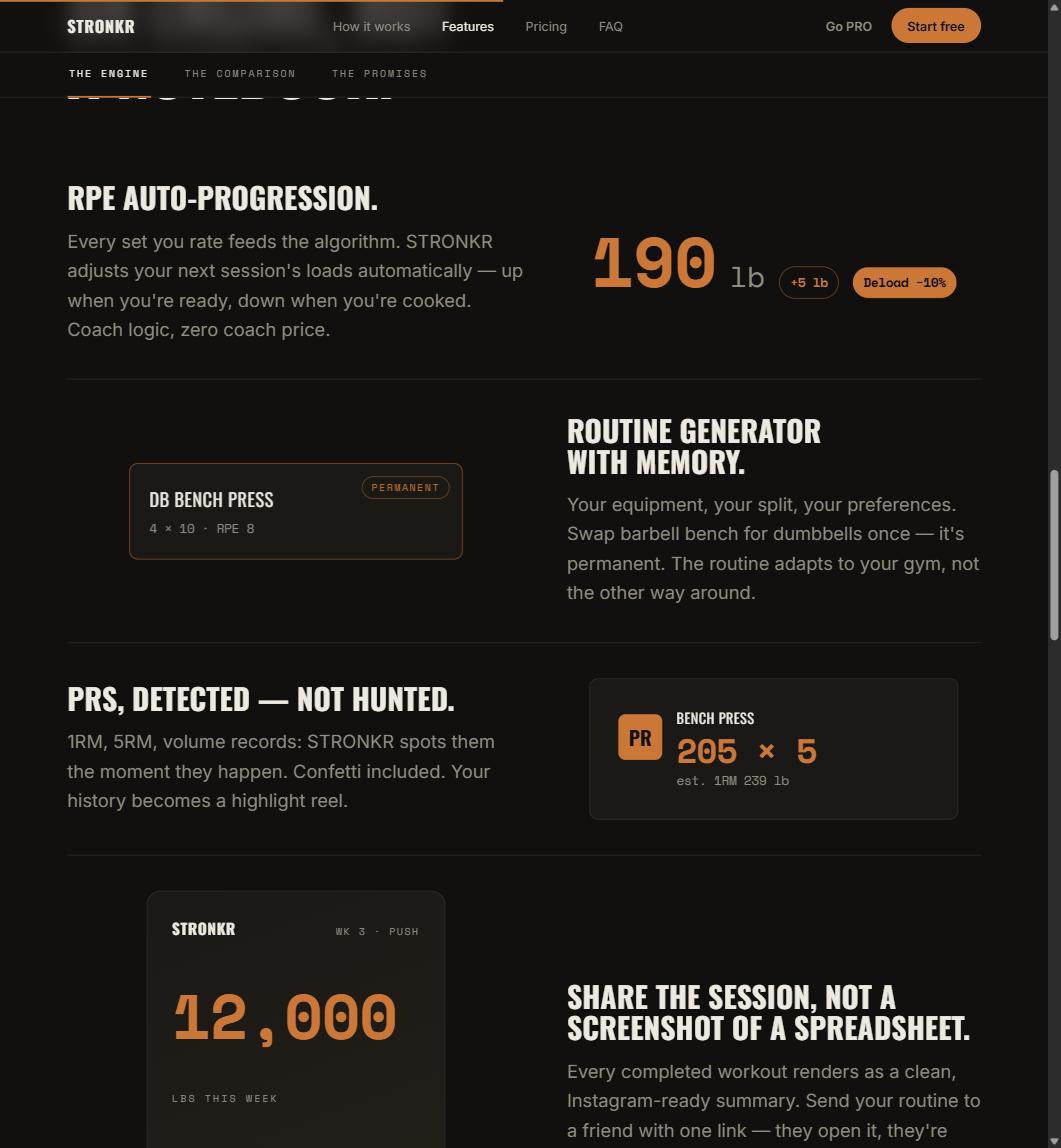
The engine resolves to one of two prescriptions for the next session: a target increase such as +5 lb, or Deload -10%. There is no third state where it hands you a graph and wishes you luck. The full mechanism is in what RPE auto-progression is and how it sets your next load.
What is the actual signal that you need a deload?
Rising effort at constant output. That is it, and it is measurable.
Why the weight column lies
A logged set of 225 x 5 looks identical whether it cost you an RPE 7 or an RPE 9.5. Strip the effort rating out and three weeks of accumulating fatigue produce a perfectly flat, perfectly uninformative line. The plateau was visible the whole time; the log just was not recording the variable that showed it.
What RPE adds
RPE in the strength sense is anchored to repetitions in reserve, an 8 means roughly two left. Helms et al. (2016), in the Strength and Conditioning Journal, set out how to apply that scale to programming decisions rather than treating it as a diary entry. Once effort is a logged number, the drift is arithmetic instead of intuition.
A plateau does not start when the bar stops moving. It starts three weeks earlier, when the same bar starts costing more.
Why is a fixed deload week usually mistimed?
Because it is scheduled against the calendar, and fatigue is not.
Your lifts are not on the same clock
Bench, squat and overhead press accumulate fatigue at different rates depending on frequency, volume, how the week went, and which joint is currently complaining. A program-wide deload week treats them as one system. Half your lifts get a back-off they did not need; the one that needed it two weeks ago finally gets it.
The miss is expensive in both directions
Deload too early and you have spent a week of training on a problem you did not have. Deload too late and you have spent three weeks grinding sets that produced fatigue without adaptation, which is the worst trade in the sport. Neither shows up as a dramatic failure. Both show up as a year with less on the bar than there should be.
Deloading on a schedule is a guess wearing the clothes of discipline.
If reading that history is the part you would rather not do by hand, the routine generator takes about two minutes, equipment, schedule, experience level, and hands back a routine that already carries progression logic. No card, no trial clock.
What does the prescription look like when the app makes the call?
Concrete, and attached to a specific lift.
A number, not a suggestion
Deload -10% is a load instruction. You open the session and the target is already reduced. Nothing is asked of you between sessions: no percentage math, no decision about whether this week is “the” week, no negotiation with yourself at 6am about whether you are actually tired or just unmotivated.
Why it lands next session
The rating you give today feeds the next session’s target, not the workout in front of you. That is deliberate. A single set is a noisy sample, and reacting to one bad rep mid-workout is how people talk themselves out of productive sets. The pattern across sessions is the thing worth acting on, and reading it properly is what the Progress, Load screen is for.
The useful question was never “am I tired”. It was “is this specific lift costing more than it did last month”.
Can I just push through instead?
Sometimes. The problem is that you cannot tell which time this is without the data.
What pushing through actually costs
An RPE that has climbed from 7 to 9 at a fixed load means you are training closer to failure for the same stimulus. That is more fatigue per unit of adaptation, and it compounds. Two more weeks of it typically produces the missed rep you were trying to avoid, plus a longer climb back.
The honest limit
Nothing in an app knows about your sleep, your work travel, or the fact that you moved apartments last weekend. What it knows is your logged effort against your logged loads, which is a better input than the memory of how last Tuesday felt. Use it as the default and override it when you have a reason. Calibrating those ratings so the drift is real and not noise is covered in what RPE 8 actually means and why the productive zone is 6 to 9.
Stronkr installs from the browser, a PWA, no app store, and works offline in a gym with no signal. RPE auto-progression, including the deload call, sits in the free forever core along with the routine generator, volume and PR tracking and 90-day history, for $0 with no credit card. Log three sessions of a stalling lift at stronkr.com and see whether the engine flags it before you would have.
Try auto-regulated training
Stronkr reads your RPE after every set and adjusts next session’s load for you. No spreadsheets, no guessing.
Start training with StronkrFrequently asked questions
When should I deload?
When the same load starts costing more than it used to. The usable signal is RPE drifting upward at a fixed weight across sessions, 7, then 8, then 9 on the same bar. A calendar week off every fourth week is a guess that will sometimes land, and often will not.
How does Stronkr decide I need a deload?
From the RPE ratings you give each set. The site states the app suggests a deload when your RPE spikes, before you stall. The prescription arrives for the next session as Deload -10%, rather than as a chart you are left to interpret on a Sunday evening.
How big is a deload in Stronkr?
Ten percent off the load, shown as Deload -10%. Stronkr tracks progression per exercise on the Progress, Load screen, so the decision is made against the lift's own history rather than against a program-wide calendar. PRO additionally lists personalized deloads among its features.
Is a deload the same as taking a week off?
No. A deload reduces the load while you keep training and keep logging, which means the engine keeps getting data. A week off produces no ratings at all, so nothing gets recalibrated and you return to the same numbers that were already too heavy for you.
What if my RPE ratings are inconsistent?
They will be at first, and the engine reads a trend rather than a single number. The set screen shows the productive zone as 6 to 9 and a question-mark button opens an in-app explainer. Consistency matters more than precision: rate the same way each time and the drift becomes readable.
Keep reading
PRs You Didn't Have to Hunt For: Automatic Record Detection
Automatic pr tracking that runs off your normal sets: Stronkr detects 1RM, 5RM, volume and estimated 1RM records without you flagging a single thing.
One Session End to End: From Warm-Up to Next Week's Load
A full workout logging flow, set by set: open today's session, log weight, reps and RPE, mark warm-ups, report pain, and see what changes next session.
Progressive Overload Without a Spreadsheet
A progressive overload app should do the arithmetic, not just chart it. How Stronkr turns each set's RPE into the next session's load, no sheet needed.