Swap It Once, It Remembers: Equipment-Aware Routines
The Stronkr Founder Founder, Stronkr
6 min read
On this page
You are three weeks into a block and the one functional cable station is occupied by a man doing curls in it. Or the hotel gym tops out at 50 lb dumbbells and has no rack. Workout app exercise substitution is supposed to handle this, and in most trackers it does not, because the swap is a one-off. You pick something else, log it, and next week the app hands you back the exercise you still cannot do. So you make the same decision again. And again, until you stop opening the app on travel weeks.
Stronkr treats a swap as a decision you make once. You tap Swap Exercise, pick a same-muscle alternative tagged by the equipment you actually have, and that substitution applies to every future session of that routine. The routine changes, not just today’s log.
Key takeaways
- The swap sheet shows same-muscle alternatives, each tagged by the equipment it needs, so you are choosing against reality rather than guessing.
- A swap in Stronkr is permanent: it applies to every future session of that routine until you change it again.
- Substituting one movement does not disturb the rest of the program or its progression.
- Equipment and injury areas are captured in onboarding, so most substitutions never need to happen mid-session in the first place.
What This Looks Like in Stronkr
Here is the whole interaction, on the real screens.
- Start a session. The set screen shows the exercise and which set you are on, weight and reps fields with a KG/LBS toggle, and the RPE 1-10 selector with a
?next to it if you want the explainer. - Below the orange COMPLETE SET button there is a Swap Exercise control. Tap it.
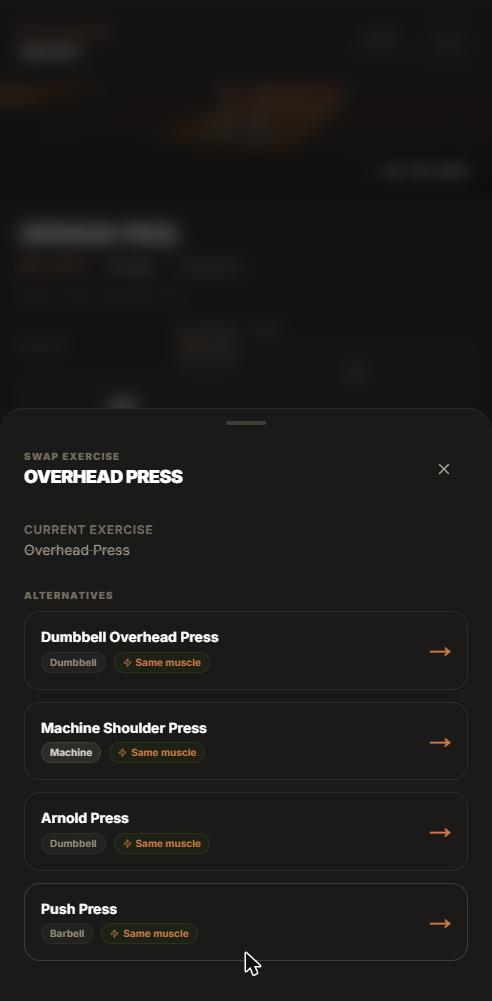
- The swap sheet opens. It lists alternatives that train the same muscle, and each one carries a tag for the equipment it requires.
- Pick the one you can actually do today. The session continues with the substitute in that slot, and you log weight, reps and RPE against it as normal.
- It stays. Next week the routine already contains the substitute. There is no second decision to make.
That is the entire feature. It is not clever. It is just the version that respects the fact that your gym did not change back overnight.
Why does a temporary swap cost more than the missed exercise?
The exercise is not the expensive part
Dropping a barbell row for a chest-supported row costs you almost nothing in training terms. Both load the same muscles in the same rep range and both progress. The cost is not physiological.
The re-decision is the expensive part
The cost is that you had to think about it, and you will have to think about it again in seven days, and again the week after. That is the same tax the spreadsheet charges, moved from progression math to exercise selection. Over a twelve-week block with a bad shoulder or a shared rack, that is thirty small decisions you did not sign up for.
A tracker that forgets your swap is not neutral. It is quietly asking you to re-do your own programming every week.
Forgetting also fragments your record
If the app reverts, your history splits into a jagged series of one-week experiments instead of one continuous line per exercise. Progression history is tracked per exercise in Stronkr, which only helps if the exercise stays put. A permanent swap keeps the line continuous.
What does “same muscle, different equipment” actually mean here?
Tagged, not vaguely similar
Every alternative in the sheet carries an equipment tag. That is the part that makes it usable in a hotel basement: you are not reading a list of exercise names and mentally checking each one against the three dumbbells in the corner, you are reading tags. This is also the mechanism behind what makes a routine intelligent, not adjectives, just constraints applied where they belong.
The rest of the session does not move
Stronkr substitutes only what is contraindicated or unavailable and keeps the rest of the program, and its progression, intact. If the cable station is busy, you replace one movement. You do not get handed a different workout because one piece of equipment was occupied.
You pick, not the app
The sheet proposes; you decide. That matters for lifters who know their own bodies well enough to have opinions about which row variation their elbow tolerates. The app narrows the field to same-muscle options you can actually perform. The last call is yours.
If you want to see what the sheet offers against your own lifts, the onboarding is about two minutes and the routine it generates is yours to argue with.
Can I set my equipment up front instead?
Onboarding asks first
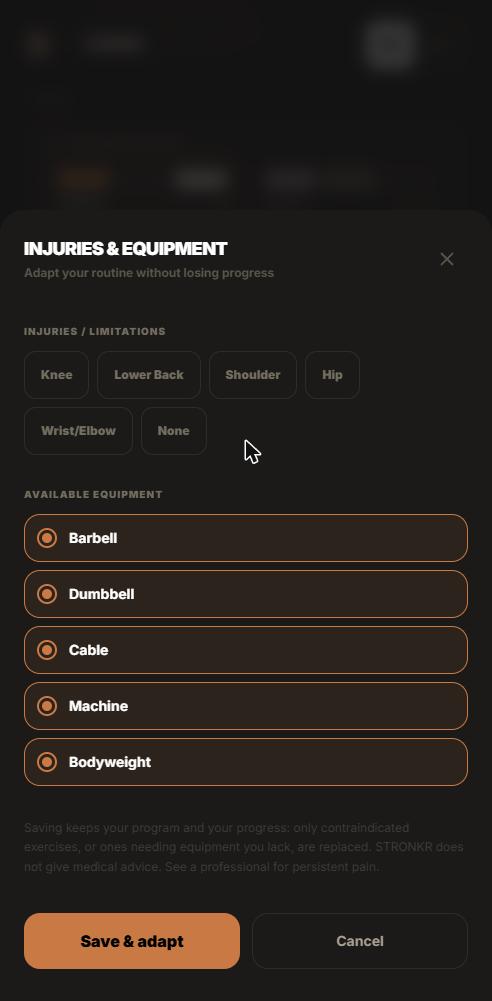
Before you ever hit a session screen, Stronkr asks for your injury areas and your available equipment, along with your schedule and experience level. The generated routine is built from those answers, so the common case is that the substitution already happened before you walked into the gym.
In-session swap is for the unplanned
The swap sheet exists for what onboarding could not know: the occupied rack, the broken machine, the week your gym is closed for a refit. Those are the substitutions that have to happen at 6:40am with a phone in one hand, and they are exactly the ones every other app forgets.
Constraints move, so the routine has to move
Most intermediates train in more than one place in a given month: a commercial gym, a garage rack, sometimes a hotel basement. This is the same logic underneath the six adaptive programs, where a joint or a recovery constraint is a first-class input rather than something you patch by hand.
Constraints are not edge cases. For anyone three years in, they are the normal operating condition.
How does a swap interact with RPE auto-progression?
The substitute progresses on its own logged data
Stronkr sets your next session’s load from the RPE you rate each set. A substituted exercise is not exempt from that: you rate it like anything else, and its target for the next session comes from what you actually logged. What it does not do is inherit somebody else’s history to make the numbers look tidy.
Your other lifts keep their line
Because only the substituted movement changed, everything else in the routine keeps progressing on the schedule it was already on. If you want the mechanism in detail, RPE auto-progression covers how a rating becomes a target increase or a deload.
This is the difference between recording and prescribing
An app that logs your substitute and then forgets it has recorded a workout. An app that carries the substitute forward and keeps prescribing against it has changed your program. That gap is the whole argument in tracker versus programmer.
Swapping is not the feature. Remembering is the feature.
Stronkr installs from the browser at stronkr.com, no app store, works offline, and the core is free forever with no credit card: unlimited routines, the routine generator, RPE auto-progression, volume and PR tracking, and 90 days of history. Answer the equipment and injury questions once and the routine you get already accounts for the gym you are standing in.
Try auto-regulated training
Stronkr reads your RPE after every set and adjusts next session’s load for you. No spreadsheets, no guessing.
Start training with StronkrFrequently asked questions
Is the exercise substitution permanent or just for today's session?
Permanent. When you swap an exercise in Stronkr, the substitution applies to every future session of that routine, not only the one you are in. You do not re-make the decision each week. If your situation changes later, swap again and the newer choice is what carries forward.
How does Stronkr choose which alternatives to show?
The swap sheet lists alternatives that train the same muscle, each tagged by the equipment it requires. You read the tags against what is actually in front of you, whether that is a rack, dumbbells, a machine, or nothing at all, and you choose the substitute yourself.
Does swapping an exercise reset my progression?
No. Substituting one movement does not touch the rest of the program or its progression, which stays intact. Progression history is tracked per exercise, so the substitute builds its own record from the sessions you log it in, and your other lifts keep moving as before.
Can I set equipment limits before I start instead of swapping mid-session?
Yes. Onboarding includes a step where you mark your injury areas and the equipment you have available, and the generated routine is built around both. The in-session swap is for what onboarding could not predict: an occupied rack, a broken machine, a hotel gym you did not plan for.
What if I swap and then regret the choice?
Swap again. The Swap Exercise control sits on the session screen every time, so a substitution you dislike costs you one session rather than a rebuilt routine. Making the change permanent is about ending the weekly re-decision, not about locking your routine down for good.
Keep reading
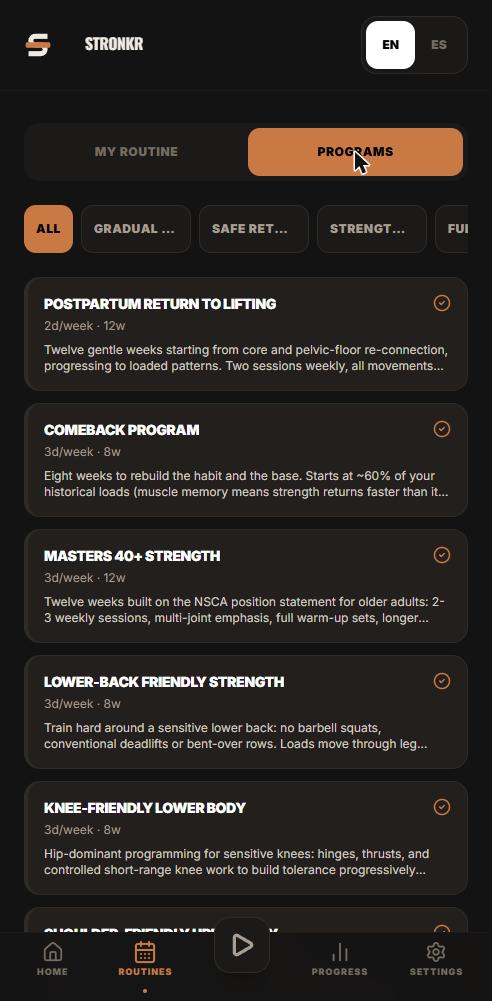
Coming Back After a Layoff Without Redlining Week One
A return to lifting after a break fails in week one, not week six. How RPE-based load selection sets comeback loads from what today actually felt like.
Knee-Friendly Lower Body Training That Still Progresses
A knee friendly leg workout you select, not improvise. Stronkr substitutes only what is contraindicated and keeps the rest of your lower body progressing.
Lower-Back Friendly Lifting: Programming Around It, Not Quitting
A lower back friendly workout built for continuity. Stronkr swaps only what is contraindicated, keeps the rest progressing, and sets load from your RPE.